
Do you want to get the most out of your solar and battery system? You need a good solar monitoring solution. Here is an overview of the top-rated solar monitoring apps available in Australia.
Why is a good solar monitoring app important?
Without monitoring, you’re flying blind – you could be losing hundreds of dollars a year due to a failed inverter or underperforming system without even realizing it.
A great app makes monitoring effortless, with clear charts, instant alerts and easy comparisons over time, so you can get every penny of value from your solar investment.
If you can see exactly how much you’re producing, you can shift your home’s energy use – such as when you use your air conditioner or dishwasher – to when the sun is shining.
Although there are third-party solutions, let’s look at the apps offered by inverter manufacturers below. Therefore, it is worth considering app performance before choosing which inverter brand to install.
A clear winner
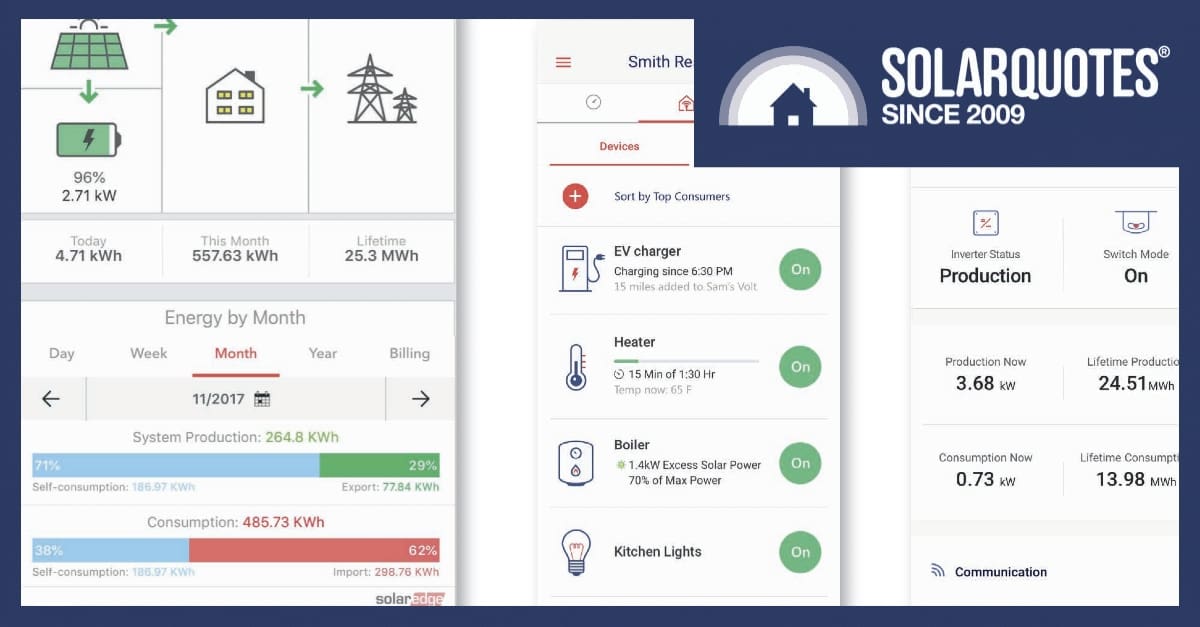
We conducted an analysis of the top-rated solar monitoring apps based on reviews in the Google Play Store and Apple App Store, and the mySolarEdge app was clearly in first place.
However, if you don’t have or don’t want to buy a SolarEdge inverter because of sensitive technical support or ties to the Israeli government, there are a handful of other apps with good reviews. However, keep in mind that there are significant differences in the evaluation results on Google Play and the Apple App Store between the alternatives. Therefore, consider whether you are using an Android or an Apple device.
The top rated solar monitoring app in Australia
mySolarEdge
Google Play Store: average rating of 4.4 out of 5
Apple App Store: 4.6 out of 5 average ratings
What users liked: Tracks real-time energy consumption and production, identifies energy efficiency opportunities, controls smart home devices and electric vehicle charging, displays inverter status for troubleshooting, and is available on Google Wear OS.
What users have complained about: Poor customer support, incorrect production data due to off-peak battery charging, aggregation of data from multiple inverters/batteries (making individual assessment difficult).
For detailed information on SolarEdge inverters used with their solar monitoring app, see our review.
Other apps worth considering
Enphase Enlighten
Google Play Store: average rating of 3.9 out of 5
Apple App Store: 4.6 out of 5 average ratings
What users liked: Checks system health and performance, displays energy production, analyzes performance compared to historical weather data, responsive developers, good for displaying energy produced, 12-month access to raw data.
What users have complained about: Notifications often don’t work, multiple connection attempts are required, updates cause internet connection issues and inaccurate data, less DIY friendly, support refers to installer, display limitation for microinverters.
For more information on Enphase inverters used with their solar monitoring app, check out our review.
SMA Energy
Google Play Store: average rating of 4.1 out of 5
Apple App Store: average rating of 3.5 out of 5
What users liked: Clear presentation of important data, intelligent management of energy flows and electric vehicle charging, provision of solar power production forecasts, DarkMode, improved accessibility and landscape format available.
What users have complained about: Doesn’t show much data beyond produced energy, slow update and commissioning, no individual inverter data for multiple inverters, no estimated versus actual production data, poor color selection and low contrast in charts, slower navigation between time period charts, app crashes frequently, issues transferring data from old Sunny Portal accounts.
For more information about SMA Energy inverters used with the solar monitoring app, see our review.
Tesla
Google Play Store: Average rating: 3 out of 5
Apple App Store: Average rating 4.3 out of 5
What users liked: Comprehensive control of Tesla vehicles and energy products, real-time monitoring of solar and powerwall, ability to download solar production and battery usage data.
What users have complained about: Poor graphical user interface for charging statistics, limited control over data display (e.g. clickable calendar, data export), slow and unresponsive user interface, lengthy account setup for EV charging, lack of weather integration for battery charging, large app size, less intuitive charging user interface compared to competitors.
For more information on the Tesla Powerwall 3 used with Tesla’s solar monitoring app, see our review.
For more information on how to get the most out of solar monitoring, check out our detailed guide.

Comments are closed.